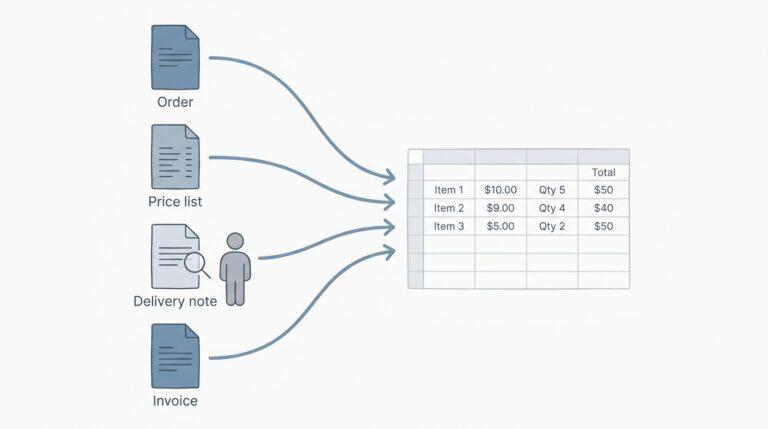
An emailed order lands in the shared inbox, the software lifts every word and number off the page, and then it reaches the part of the job that decides whether your afternoon goes well: working out which of your products the buyer actually meant. That matching step is where most of the real work in AI order processing happens, and it’s the step most demos hurry past. I’ve spent a lot of time looking at how these systems read documents (odd layouts, crooked scans, the PDF someone printed and then photographed on a loading dock), and the reading has become very good. Matching is a different story, and it’s the one worth understanding before you hand any part of your order desk to a machine.
AI order entry already handles most of an order well. A few kinds of line still deserve a person’s eyes, every single time.
Reading the text is solved. Knowing what the buyer wants isn’t.
On a trip last year I pointed Google Lens at a handwritten menu in a small family restaurant, and it translated every line almost instantly, including a dish name scrawled sideways in the margin. It was genuinely impressive, the kind of thing that would have felt like science fiction when I first started working with OCR.
And yet I still had no idea what to order, because the app could tell me a dish was “pork with seasonal greens” but not whether it was the one the next table kept raving about, or whether it came as a small plate or a pot meant for sharing. Reading the words and understanding what someone wants from them turned out to be completely separate problems. Order documents work exactly the same way, and the hard part only starts once the text is off the page.
When Botowski ran its reader over a food and drink distributor’s real orders (25 documents, 291 lines, arriving as emails, PDFs and scans), every line and quantity was read correctly. That matches what I see more broadly: current models read messy pages far better than the template-based OCR tools of a few years ago, which needed someone to draw boxes around each field for every customer’s layout. (People often assume scans are the hard part, but a slightly crooked scan of a tidy order form is usually easier to read than a nicely formatted email where the buyer wrote “same as last week but more of the oat milk”.)
Why “case water” is harder than it looks, and why a good tool asks
Matching is the step where a tool either earns your trust or loses it. Why it’s hard explains almost everything else about how these tools should behave.
Take a single product, a case of still water in litre bottles. In your product list it might be “WATER STILL 6X1L”, one customer writes “1L x 6 still”, another writes “case water”, and somebody who has ordered it for years just writes “the usual water” and assumes you know.
A matcher scores how similar each of these is to every item in your list, using shared words, overlapping characters, pack-size patterns and sometimes that customer’s past orders. On pure text, “WATER STILL 6X1L” and “WATER SPARK 6X1L” differ by only a handful of letters, so a naive comparison rates them as nearly identical even though they’re different products, while “1L x 6 still” looks quite different from the list entry despite being exactly the same thing. Better systems normalise pack sizes first (turning both versions into six bottles of one litre), but “case water” carries no size and no type at all, so the honest result is several candidates with roughly equal scores.
That’s what a confidence score is for. Tools work it out in several different ways. One common way is the margin between the top two candidates: how far the best guess sits ahead of the next one. When the top candidate is well clear of the rest, matching automatically is safe. If it’s neck and neck with the sparkling version and the bigger bottle, any pick is a coin toss dressed up as a decision.
In Botowski’s pilot with the same distributor, on their live order mailbox, roughly 1 in 5 lines still needed a person’s decision, mostly because several products were equally good candidates, not because the product was missing. Those questions are AI sales order processing working as intended, since the order itself usually didn’t contain enough information to choose.
I once sat next to an order-desk clerk for a morning while she worked through a pile of emailed orders, and somewhere around her mid-morning coffee she told me the thing I now repeat to everyone who builds these tools: “I don’t need it right every time, I need it to tell me when it isn’t sure.” What worried her about software was the silent mistake, the kind that surfaces days later as a credit note. A tool that guesses without saying so turns her into an auditor who has to recheck everything, while a tool that asks leaves her making the handful of real decisions she was always best at.
Where exactly the line should sit between “match it automatically” and “ask a person” is something I honestly haven’t settled. Set the confidence bar too high and the order desk drowns in questions about lines any human would match at a glance, so people start approving suggestions without reading them, which defeats the whole point. Too low, and the wrong sparkling water ships to a customer who never drinks it. I’m still adjusting my own instinct with every batch of real orders I look at, and I’m wary of anyone who claims there’s a universal setting that suits every distributor. If you’re testing a tool that reads emailed orders and matches each line to your own product list and prices, spend less time admiring the lines it handles alone and more time watching how it behaves on the lines it can’t settle.
Unclear products, changed prices, odd quantities: always a person
Whatever threshold you end up with, some lines deserve human eyes no matter how confident the software claims to be. I’d put these on every order desk’s list, and I’d expect the tool to flag them without being asked.
- Unclear products, meaning any line where the top candidates sit close together, or where the buyer used a nickname like “the usual” or “the big ones” that only makes sense with history.
- Price changes, where the price on the buyer’s purchase order doesn’t match your list, because someone is working from an old price sheet, a promised discount or a simple typo, and only a person knows which.
- Odd quantities, such as a regular customer who normally takes a few cases suddenly ordering with an extra zero on the end, which might be a big event or might be a key pressed twice on a phone.
In every one of these, the text on the page is perfectly clear. What’s missing is context that lives in someone’s head, a phone call last week or a deal agreed at a trade show. (A common misconception is that more training data will fix this, but no amount of model improvement tells software that your sales rep promised a customer last year’s price until the end of the month.) That gap marks the useful boundary between software and people, and I’d leave it where it is.
Before you buy: questions that get past the demo
Demos are built from clean orders, so the useful questions are the ones that drag the conversation toward your messy ones.
- What happens to a line the tool isn’t sure about, and can I see why it wasn’t sure?
- Can I send you a batch of my own real orders, ugly ones included, and see the results before paying anything?
- Does it check the prices on each order against my price list, or only the product codes?
- What exactly comes out the other end, and will my accounting or inventory system import it as a sales order or as an invoice?
That last question catches more people than you’d expect. Plenty of tools hand you an import file rather than a live connection, which is fine, but in QuickBooks Online and Xero an import generally creates invoices (in Xero’s case, draft invoices) rather than sales orders, while inventory tools such as Cin7 or Unleashed take sales orders. Knowing which one you’ll get tells you where the person checking each order sits in your process. In my experience that matters more than any accuracy figure printed on a sales page.

A tool that asks is doing its job
Buyers will keep writing the way they talk, leaving out pack sizes and assuming you remember exactly what they had last time. A tool that never asks you anything isn’t being careful, it’s just being quiet.