Most people assume a purchase order and a sales order are the same document with a different heading on top. They aren’t, and in my experience the gap between them is where most of the reconciliation headaches at a small wholesaler start (ask anyone who has spent a month-end chasing a short payment).
Search for purchase order vs sales order and you’ll get a tidy definition: the buyer writes one, the seller writes the other. True. Not much help if you’re the one turning the first into the second before the van leaves.
That turning-into step is the real job of an order desk. It’s also the step that newer sales order processing software is built around, which says a lot about where the time actually goes. Typing an order in is quick. Working out what the buyer meant by each line is the slow part, and whoever or whatever does it (a person, a program, me on a bad day), you need to know exactly what’s being translated.
One order, seen from both sides of the counter
A purchase order is the buyer’s document. Somebody on their side (a purchasing manager, a head chef, an owner on a Sunday evening) writes down what they want in their own words and sends it over. It commits them, more or less, to buying those goods. You’re committed to nothing until you accept it. And every part of it is written from their point of view: their item names, their reference number, their idea of what things cost.
A sales order is the same deal written from your side. If you want the difference between purchase order and sales order in one line, it’s this: one is a request in the customer’s language, the other is an instruction in yours.
What a purchase order brings, and what it quietly leaves out
What usually lands in the inbox
Credit where it’s due, most purchase orders I see are perfectly reasonable documents. They tend to carry the buyer’s name and delivery address, a PO number, a requested delivery date, and a list of lines with a description, a quantity and sometimes a price. Some arrive as clean PDFs exported from the buyer’s own system. Others turn up as a photo of a handwritten sheet, a spreadsheet with merged cells everywhere, or one line in an email that says “same as last week but double the oat milk.”
What your sales order needs that the PO never had
A few things are almost always missing.
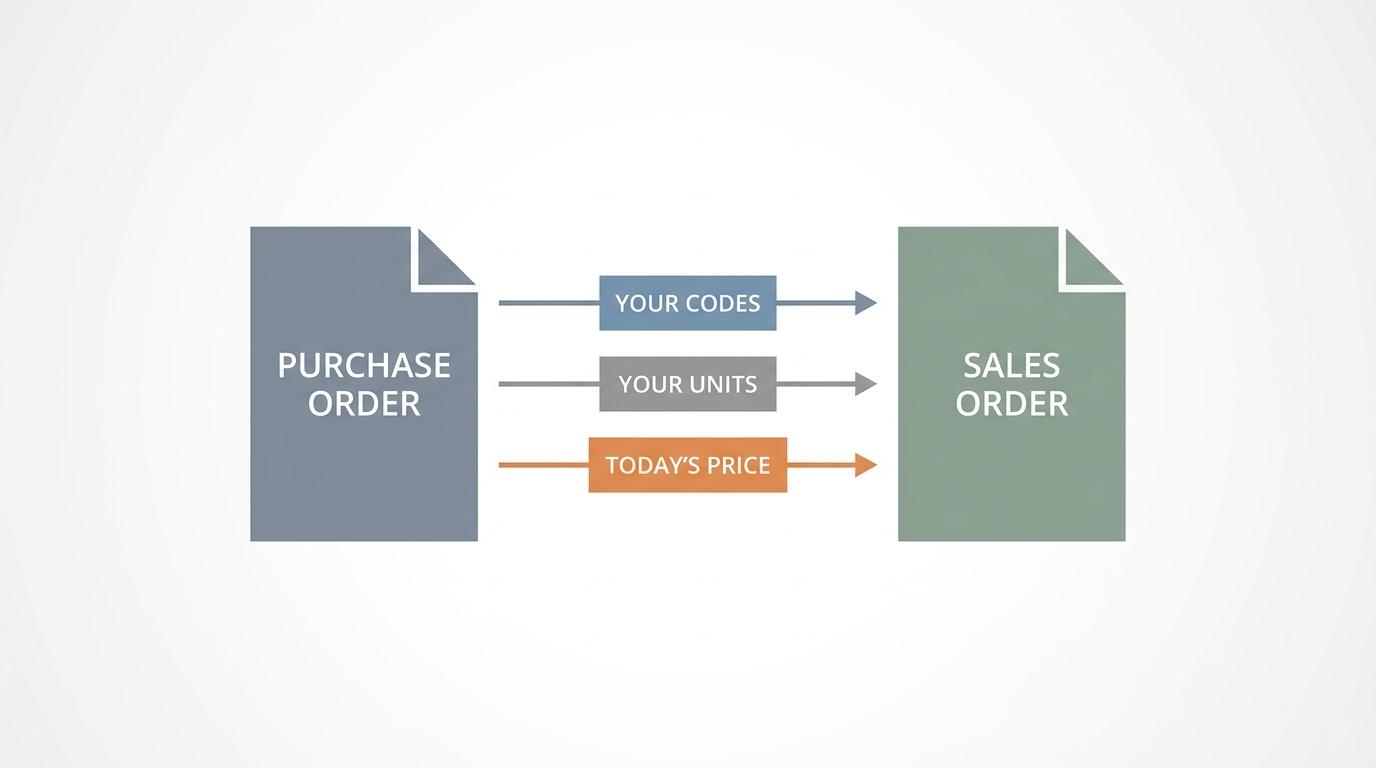
- Your product codes. The buyer writes “Greek yog large tub”. In your system that’s a specific item, and possibly two items (plain and honey), and only one of them is right.
- Your units. Buyers often write a quantity with no unit at all. Whether that means cases or single bottles depends on who you ask and how busy they were that morning.
- Today’s price. The price on a PO is whatever the buyer paid last time, or whatever a rep quoted months ago. Your sales order should carry what your price list says now, for that customer.
Add the customer’s account in your own system, and often a delivery route or day, and you have the full gap. None of that is the buyer’s job, to be fair; they don’t know your codes and shouldn’t have to. Someone on your side fills it in on every order, usually from memory and a price list taped to the side of the monitor.
Why that matters only clicked for me when a warehouse lead at one of my clients put it plainly, while I was chasing a short delivery. “I don’t pick from what the customer sent,” he said, “I pick from what the office typed.” He wasn’t making excuses, he was just telling me how it works: the purchase order never reaches the warehouse floor, so whatever got lost or changed on the way into the sales order is what the customer receives (and, a few weeks later, what I invoice).
That makes the sales order the document that actually matters.
Where mistakes creep in between the two
Most errors aren’t dramatic. They’re small translation slips, and they follow a pattern once you start looking.
Units and look-alike items
If the PO gives a quantity without a unit, someone guesses. Should the guess be cases when the buyer meant singles, the delivery is enormous, most of it comes back, and a credit note should follow. When nobody raises that credit note before month-end, the receivable sits there overstated until someone like me trips over it in the aged debtors report. Look-alike items do the same damage more quietly: the buyer’s description fits two of your products, the office picks the one you sell more often, and nobody notices until the customer does.
“Their price” versus your price
Buyers love copying last month’s PO and changing only the quantities, so the prices on it drift. Copy their price and you’ve given a discount nobody approved; use yours and their accounts team short-pays you (guess who sorts out the remittance).
Whose number is this, anyway?
This one I got wrong myself. Early on, at one client, I treated the buyer’s PO number as if it were the distributor’s own order reference. It looked official, it was printed on every document, and matching on it felt like the obvious thing to do. Then one large customer reused a standing PO number across several deliveries, and another customer’s numbering happened to overlap with it. I spent most of that month-end unpicking which invoice belonged to which order, with the slightly sick feeling you get when the mistake isn’t in anyone’s data but in your own method.
Keep both numbers. Match on yours.
It’s also why I have a small habit now. On the first working day of each month, before I touch anything else, I open one client’s buyer purchase orders and lay them side by side with the invoices that went out against them. Line by line, unit by unit, price by price (the coffee beside the keyboard goes cold every single time, and I’ve stopped pretending it won’t). Usually I find nothing and feel slightly silly about it. But every so often something turns up that would have cost a client real money, so I keep doing it.
What if the books only know invoices?
Plenty of small distributors never see a sales order in their accounting program, and that isn’t automatically a problem. It depends on what they run. QuickBooks Online does have sales orders now, but Intuit’s own help page on creating and managing sales orders limits manual creation to Plus, Advanced and Intuit Enterprise Suite, with Simple Start and Essentials needing the paid Inventory add-on. Xero has quotes, invoices and purchase orders (the buying kind), and I can’t find a native sales order in it; on Xero’s own product ideas board, a long-running request for an order acknowledgement step got a reply from a Xero community manager saying there were no plans to build one. Menus and plans change, so check your own subscription before you rely on any of this.
If there’s no sales order in the books, the invoice becomes the first document in the system that speaks your language. Once the invoice is the first document, every translation (codes, units, price, customer account) happens at the moment of invoicing, often by someone typing straight from the PO. Suppose that same person told the warehouse what to pick earlier, out loud or on a sticky note: now you have two versions of the order and no record of the one the warehouse actually used. And if the delivery comes up short, nobody can say whether the error was in the picking or in the invoice.
Some clients close that gap with an inventory program that holds the sales orders and passes invoices through to the books. Others use draft invoices in Xero, or quotes, as a stand-in, so at least something in the system records the order before the goods leave.
Whichever setup you have, try my month-start check before your next close: pick one customer, pull a week of their purchase orders, and put each one next to whatever your warehouse picked from and the invoice that followed. If all three agree, leave it alone. Where they don’t, write down which step changed the line, and fix that step first.