Pick up the next purchase order that lands on your desk and follow it for a day. Count the people who read it. Then count the ones who type it. On most desks I’ve worked, mine included, that second number is higher than anyone would admit out loud.
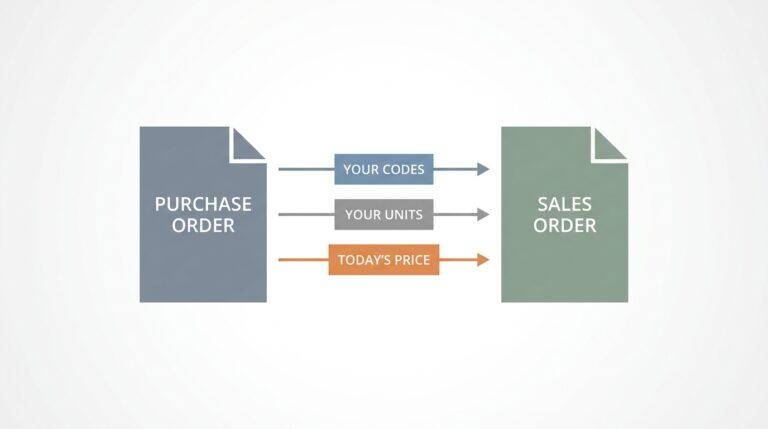
The buyer typed it once already. Then we type it all again. That second round of typing is what most of us call order entry. Their document goes in and ours comes out: their product names turn into our codes, their “the usual” turns into a real quantity, and their price turns into the price they’re actually on. Getting from purchase order to sales order is mostly translation, and translation is where the mistakes live.
Tools now exist that read emailed orders and match each line to your own price list, and I’ll get to what they can and can’t do. But the sequence you set things up in matters more than the tool you pick.
The sequence goes like this. One inbox first. Then a cleaned-up product list. Only after that do you read, match, check and import. Skip ahead and you just automate the mess.
Where do your orders actually land?
Think about last Monday. Orders came in by email, sure, but also as a voicemail left at 6 in the morning, a photo of a handwritten list on a rep’s phone, and a PDF buried in a reply to a thread from March. Each of those needed a different person to notice it. My first month on the desk, Monday meant the fax machine.
The machine curled every page like a receipt left on a car dashboard, and it jammed right when the big weekend orders came through. I learned that month which buyer wrote a 7 that looked like a 1, mostly by getting it wrong once.
You only short a café on tonic water one time.
We got rid of the fax years ago. What I kept from those Mondays is a suspicion of orders that arrive anywhere odd. They get handled by different people at different speeds, and the ones that slip are always the voicemail, the text, the photo. Nobody drops them on purpose; they just sit somewhere nobody checks first. So step one is dull, and it’s the one that pays off first: every order goes to one address.
Set up a shared mailbox, something like orders@, and make it the only answer anyone gives a buyer. Reps who get a photo on their phone forward it there. Whoever takes a phone order writes it up as a quick email to the same address, even if it’s only a few lines. Voicemails get a short summary sent there too.
Inside that mailbox, keep it simple: new, waiting on the buyer, entered. Anything still sitting in new at lunchtime is a problem you can see, instead of one you hear about from a customer asking where their delivery is.
Why bother, if you’re still going to type everything? Because one inbox gives you a queue you can see. By the end of the week you’ll know how many orders really arrive, in what shapes, from which buyers, and that count tells you whether automating any of this is worth your money.
None of this is new, by the way. Jonathan Bein at Distribution Strategy Group passed on a line from one client’s CIO that I’d happily hang above our desk: “if I send you an email, you, the supplier, are doing order entry.” His own estimate was that keying emailed orders “can consume 20% to 40% of the time from multiple CSR’s.” Buyers won’t change that for our benefit. Why would they?
Your product list is doing more work than you think
Every line on a purchase order has to land on something you actually sell. Ours land on a product list of about 600 rows, edited over the years by everyone who ever sat at this desk.

Open yours right now. Find the product listed under slightly different names. Spot the codes nobody has ordered in years. Check whether a case means the same pack size on every row. Then hunt for the item priced at zero, because there’s always one.
None of that hurts much while the person typing has the list in their head. Hand the same list to a new hire, or to software, and every gap turns into a wrong line or a question. Our last new starter spent her first fortnight asking what most of our codes meant, and every question was fair.
What does a list in good shape look like? One row per thing you sell, with a code that never changes. A description written the way you’d say it out loud. Unit, pack size and price, each in its own column. Nothing clever. Units cause more wrong orders on our desk than anything else. A buyer means bottles, we sell cases, and nobody notices until the van is loaded. Write the pack size next to every unit, every time.
Then add the column almost nobody has: what your buyers call it. One customer writes “still small,” another uses a supplier code from a catalog you stopped printing ages ago, and a third just writes “the blue ones.” Put those names next to your product and the match stops depending on somebody’s memory.
Prices deserve their own hour. If some customers are on special prices, write those down where a person who isn’t you could find them. A sales order with the right product and the wrong price is still a phone call next week. Same goes for deals with an end date. I keep a printed price list in a fat binder next to the coffee, which tells you exactly how much I trust our spreadsheet.
When you drop a product, don’t delete the row. Mark it discontinued and note what replaces it, because buyers will keep ordering the old one from a list they printed years back, and someone has to know what to send instead. Boring work, I know. It’s also the part that decides whether anything after it works.
Read it, match it, ask about the weird line, import it
Once the inbox and the list are sorted, every order goes through the same loop, whether a person does all of it or a machine handles part of it. It’s also the loop I’d teach a new starter on day one, before they learn a single product code:
- Read. Pull out who’s ordering, the delivery date, and each line exactly as the buyer wrote it.
- Match. Find each line on your product list, with the right unit and that customer’s price. If the buyer’s price and yours disagree, that’s something to check, not something to fix quietly.
- Check what’s unclear. Anything that didn’t match cleanly goes to a person, with the original order open right next to it. A line that just says “cola” when you sell it in cans and in glass bottles is exactly the kind a person should see.
- Import. The finished order goes into your system as a file, not as another round of typing.
Where that file goes matters. Most inventory tools take an import of sales orders directly. If you run straight from QuickBooks Online or Xero, it usually comes in as invoices rather than sales orders, drafts in Xero’s case. Plan your checking around that, and compare a few orders by hand against the originals for the first weeks.
Which of this can a machine do today?
People ask me how to automate order entry as if there’s a switch somebody forgot to flip. Honest answer? A machine can do more than it used to and less than the ads say.
Typing it yourself is still a real option. A good person catches what no system will: a regular who suddenly orders far more than usual, or a delivery date on a bank holiday. The cost is time, plus the typos that creep in late on a Friday. I’d still take a careful person typing over a sloppy system guessing.
Phone orders stay with people too. Nothing I’ve seen turns a rushed call into a clean order reliably enough for a busy morning, so whoever answers writes it up and sends it to the shared inbox. Then there’s the order form. I was sure this was the answer. Over one long weekend, I built a tidy Excel form with our codes in a dropdown, sent it to every buyer, and was genuinely proud of it.
Almost nobody used it.
The few who did typed product names into the code column, deleted my dropdowns, or saved the whole thing as a PDF and emailed that instead. It took me a while to admit the form was the problem, not them. Buyers have their own systems, their own habits, and a pile of other suppliers asking them to change. Fair enough. These days I believe the desk has to accept orders however they arrive.
EDI is the grown-up version of my order form, and big chains often insist on it. Once it’s running, orders arrive already structured, with no reading needed, but setup happens customer by customer and costs money and patience. Buyer portals sit in between: some buyers love clicking through your catalog at midnight, and others keep emailing anyway. The café down the road is never going to send you either.
OCR templates work well for a buyer whose PDF never changes. You teach the system where the quantity column sits, and it reads that spot every time. The day that buyer switches software, the template quietly breaks, and handwriting or a crooked photo was never going to work with it anyway.
A tool that breaks without telling anyone worries me far more than a slow one.
Which is why, for a mixed inbox, I’d start with the newest option: AI reading, with a person checking the lines it’s unsure about. Odd layouts, photos and scruffy handwriting bother it far less than they bother templates. Mistakes still happen, so a decent setup flags its doubts and hands them to a person rather than guessing. One thing the sales pitches rush past is matching. No order entry automation can match a line better than the product list behind it allows. Back to that spreadsheet, again.
Which one fits you depends on the count from your shared inbox. If most of your volume comes from a few big chains that already send structured files, EDI or a portal earns its keep. Got lots of small buyers who email, phone and send photos however they like? Then templates will bury you, and AI reading with a person checking is the more honest fit.
What still needs a person, whichever way you go? The line that says “same as last week.” Substitutions when something’s out of stock. A price the buyer thinks is wrong, or a regular whose order just looks off. Good. Those lines were always worth a person’s time, and typing used to crowd them out. A buyer who gets a quick, friendly question about a strange line remembers it. That’s worth more than any form I ever designed.
So go back to that purchase order on your desk. Follow it again in a month, once the inbox and the product list are sorted. If it gets read once, checked where it’s unclear, and typed by nobody, you’ve done the hard part, whatever tool you end up using.
And if it still gets typed again somewhere, at least now you’ll know exactly where.