
Most people shopping for order entry software assume the demo and the accuracy figure on the pricing page will tell them whether it works. They won’t. A demo shows you the vendor’s best orders on the vendor’s best day, and an accuracy figure with no context is just a number someone put there because it looked good.
I’m a software engineer, and most of my working hours go into how documents get read: PDFs with broken text layers, phone photos taken at an angle, spreadsheets where somebody merged cells for reasons known only to them. That makes me a slightly annoying person to sit next to in a sales demo. It also means I’ve watched plenty of tools look brilliant on a sample file and then trip over the very first real order a distributor forwarded to them.
What follows is the checklist I’d hand a friend who runs a small wholesale business and is about to sign up for something.
It works whether you’re comparing dedicated order entry software for small business, a module inside a bigger wholesale order management software package, or nothing new at all. Staying with manual order entry is a legitimate answer for a lot of distributors, so it belongs in the comparison too, and I’ll treat it that way.
Bring your ugliest orders, not their prettiest ones
My weird inputs file
Whenever I evaluate any piece of software, I keep a scrappy folder I call the weird inputs file: the ugliest real examples I can find, collected over weeks, never tidied. For order tools it currently holds a blurry phone photo of a handwritten list, an email where a customer squeezed two orders for two delivery addresses into one message, and a reply-all chain where the actual order is buried under a pile of “thanks!” and “adding Sam”. There’s also a scan of a fax of a printout, which is about as close to archaeology as order processing gets. My favourite is a crumpled handwritten order sheet a customer handed to a driver, later photographed on a dark desk under a single lamp. None of it is exotic. Any order desk sees this sort of thing on an ordinary Tuesday.
I throw that file at the demo before anything else. Vendors don’t always love it, but the good ones lean in, because they’d rather find the problems now than after you’ve signed.
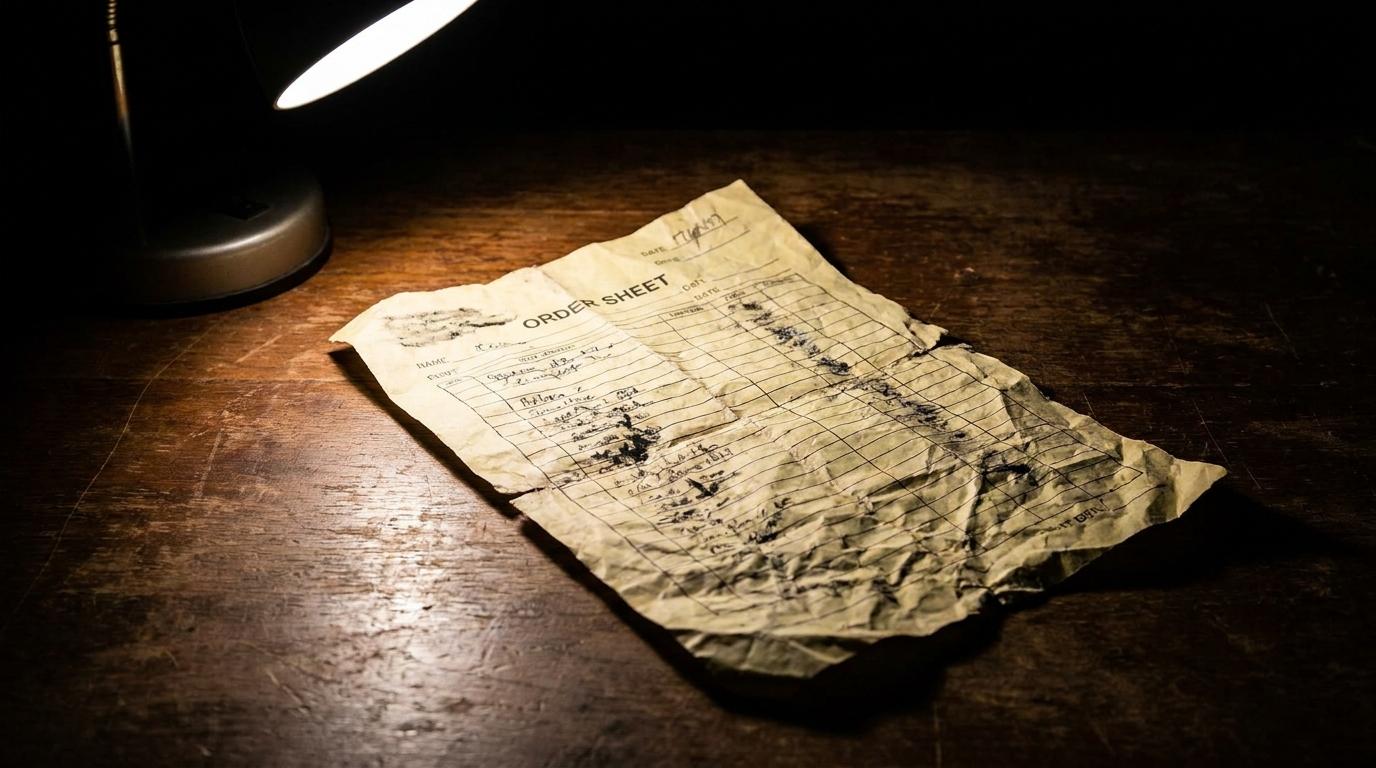
Build your own version before you talk to anyone. Pull a decent handful of real orders from the last month, and make sure it includes the ones that made your order desk sigh: the photo, the forwarded chain, the customer who writes product names from memory. Don’t clean anything up. Ask the vendor to run them while you watch, then ask for the results as a file you can check line by line against what your team actually shipped.
That goes for every kind of tool on your shortlist, and especially for the newer AI order entry software that says it can read emailed, PDF and photographed orders. Messy inputs are exactly what those tools say they handle, so your folder is the fairest test they’ll get: if one stumbles on your ugliest orders, you’ve learned that before signing anything rather than after.
Why a clean sample PDF tells you almost nothing
Here’s the technical bit, and it’s worth the detour. Most PDFs that come out of an ordering system or accounting package store their characters as real text, along with where each one sits on the page, so “reading” them is closer to copying than to reading. A demo built on files like that skips the hardest step entirely. Phone photos have no stored text at all: the software has to find the edges of the paper, straighten it, cope with the shadow of someone’s thumb, and then work out every character from pixels using OCR (optical character recognition, the part that turns a picture of letters into actual letters). Handwriting makes that harder again, and a crease straight through a quantity column makes it harder still. Even once every letter is right, the tool still has to understand the layout: which numbers are quantities and which are prices, and whether that line squeezed between two items is a product or a note saying “leave it by the back door”.
A tidy sample PDF tests the part of the problem that was solved years ago.
Erez Arnon, who co-founded an AI company that sells to distributors (so he has an interest here, which is worth keeping in mind), put the principle well on a Modern Distribution Management podcast about vetting AI vendors: “Evaluate things that you can verify and don’t trust anything that you can’t.” The same episode recommends insisting on live demonstrations with your own data rather than curated standard ones, which is really the weird inputs file with better manners.
“Accurate” on whose product list?
Reading the order is only half the job. Matching what the customer wrote to what you actually sell is the other half, and usually the harder one. Your buyers don’t use your item codes. They write “the big tins of tomatoes”, “same as last week but no rocket”, or an internal code that means something in their kitchen and nothing anywhere else.
Test the matching, not just the reading
Give the vendor your real product list, the export you’d actually use, with its duplicates, its discontinued lines and its nearly identical items that differ only by pack size. Then check each line of each test order. Did it land on the right item, at the right price for that particular customer? A tool that reads “tomatoes x6” perfectly and attaches it to the wrong tomatoes has still handed you a wrong order, and a wrong order costs you more than a slow one.
Ask, too, where the finished order ends up. Some tools give you a file to import into your accounting or inventory system, while others connect directly. Whichever kind you’re looking at, run the actual import during the trial rather than take it on faith. If the output needs someone handy with spreadsheets to tidy it before every import, count their time as part of the price.
The number I stopped trusting
For a long time I judged these tools by their headline accuracy percentage, the same way most buyers do. I’ve changed my mind. The number I care about now is how often the tool admits it isn’t sure, and how easy it makes checking those particular lines. A tool that is quietly wrong is worse than one that is loudly unsure, because quiet mistakes get picked, packed and delivered before anyone notices, while a flagged line takes a person a few seconds to confirm. If a vendor can’t tell you how often their tool raises its hand, or seems a little embarrassed that it ever does, I’d treat that as the real answer to the accuracy question.
Also ask what the percentage is actually counting. Accuracy per line and accuracy per order are very different things: if a tool gets 95 percent of lines right and its mistakes are spread evenly, a 30-line order will contain at least one error most of the time. Per order is the figure that matches how your customers experience a mistake, so that’s the one to ask for, in writing, measured on your own orders.
There’s more on which lines a person should still look at, and why, in what AI order processing gets right and where a person should still check.
Setup, price and contract: the questions that feel rude (ask them anyway)
Start with setup: what has to happen before the first real order goes through, and who does that work? Some approaches need a template built for every customer’s document layout, some need only your product list and a few sample orders, and EDI needs your buyer’s IT people and yours in the same conversation. On pricing, if the page says “contact us”, ask for the number in writing and ask what counts as a billable unit, because a document, an order, a page and a line can produce very different invoices for the same month of work. Contract length matters just as much. Signing up for a year on a tool you haven’t tested on your own orders isn’t really a purchase, it’s a bet.
When a vendor won’t name a price until after several calls, that tells you something useful as well.
What happens when it’s unsure, and who has to change?
Watch the doubtful lines
Ask to see, using your weird inputs file, exactly what happens when the tool isn’t confident. Is the doubtful line shown next to the original document, so someone can glance at it and decide, or do you get a vague warning and have to go hunting? Does it ever guess without telling you?
Pay attention to who would be doing the checking, because in most small distributors it’s the same person who types the orders today, and their judgement is the most valuable thing in the whole process. A good check step uses that judgement on the handful of lines that need it instead of wasting it on retyping the obvious ones. The bad kind buries them in so many warnings that they stop reading the warnings, which puts you right back where quiet errors live. During the trial, sit with that person while they work through the flagged lines from your weird inputs file, and ask them afterwards whether it felt faster than typing or just different.
Ask the vendor that question directly and listen to the shape of the answer. A specific one names which lines get flagged, who sees them and what they’re shown alongside; an evasive one drifts into talk about confidence scores and never quite says what happens next.
Your buyers shouldn’t have to notice
Ask whether your customers need to do anything differently. A portal login, an EDI setup or a required order form all move work onto the people who pay you, and some will happily do it while many will keep emailing exactly as before. Small restaurants and shops in particular tend to order however is quickest for them, at whatever hour suits them, which is a big part of why your buyers will probably never switch to EDI. If the software only works once buyers change their habits, you haven’t automated order entry, you’ve just moved the typing to their side of the counter.
The approaches side by side
No single approach wins on every row of this table, which is rather the point of having it.
| Approach | Setup work | What buyers must change | When an order is odd | Weak spot |
|---|---|---|---|---|
| Staying manual | None | Nothing | A person handles it, and people are good at odd | Time, and mistakes when the desk is rushed or the regular person is off |
| EDI | Heavy, on both sides | Their system must send EDI | Rejected or fixed by hand | Only works with buyers big enough to have it |
| Buyer portal | Moderate: catalogue, prices, logins | Log in and order there | Buyers who dislike it keep emailing | Depends on buyers choosing to use it |
| OCR templates | A template per document layout | Nothing, until they change their layout | New layouts fail until someone builds a template | Upkeep grows with every new customer |
| AI reading with a check step | Your product list and some sample orders | Nothing | Flags lines it’s unsure of for a person | Someone still has to check flagged lines; matching is only as good as your product list |
If your order volume is steady, your customers are few and your order desk knows every one of them by voice, the top row may honestly be the right row, and no checklist should talk you out of that. Orders arriving in a dozen formats from a long tail of small buyers are a different story, and there the bottom rows deserve a proper test. Wherever you sit, the method doesn’t change. Take your weird inputs file, your real product list and your real prices, and stop letting the vendor choose the test.
Which leaves the question I keep coming back to whenever I build one of these files myself: which order would you put in first, the one from your newest customer, or the one that only your longest-serving person on the order desk can actually read?